
Pre-flight guidelines
From Canvas to Cotton: Preparing Art for Fine Art Printing
Don’t let your hard work get lost in translation. Follow this definitive technical guide to prep your digital files for flawless Giclée and fine art gallery prints.
Capture & Resolution
The foundation of a great print is the pixel count. If your digital file lacks detail, the print will too.
___________________________
Scan or photograph your work in RAW or uncompressed TIFF formats.
Ensure the final file is exactly 300 DPI (Dots Per Inch) at the actual output print size.
Avoid AI upscaling unless absolutely necessary; native pixels always print cleanest.
The Right Color Space
Monitors display light (RGB), but printers use ink (CMYK). Managing this transition keeps your colors vibrant.
___________________________
Edit and save your workspace files in Adobe RGB (1998) or sRGB to preserve deep, rich gamuts.
Do not automatically convert to CMYK; modern fine-art 12-ink printers actually prefer wide-gamut RGB profiles.
File Formats & Bit Depth
Compression is the enemy of fine art gradients. Save your files correctly to prevent color banding.
___________________________
Export files as Flattened TIFFs, PSD, RAW or high-quality PDFs.
Use 16-bit depth if your artwork features smooth gradients or heavy digital blending. 8-bit is acceptable for high-contrast graphic art.
Borders & Margins
Give your print room to breathe and allow space for handling, matting, and artist signatures.
___________________________
Add a minimum of a 2 inch white border around your digital image canvas.
Clearly communicate with your framers and contact us whether your file dimensions include or exclude the borders.
Pre Filght Check list
To ensure your final output meets the highest standards for professional fine art reproduction, please adhere to the following technical guidelines. Proper preparation is essential to maintaining the integrity of your work from the digital screen to the final physical medium.
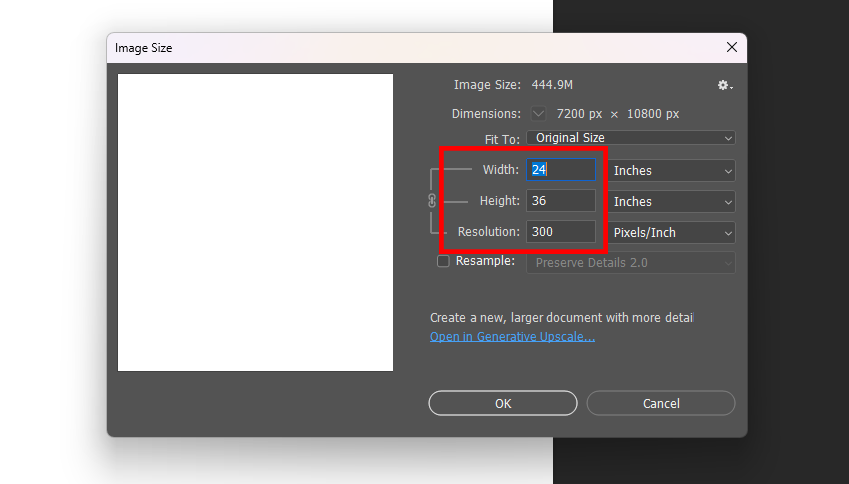
Dimension and Resolution Specifications
For the best possible print quality, your digital file must be prepared to the exact dimensions of your desired final output.
Final Print Dimensions: Ensure your canvas size accurately reflects the final print size. If your project requires a specific bleed or a white border, include this in your document dimensions before you begin your final export.
Resolution: Your image must be set to a minimum resolution of 300 pixels per inch (PPI). This density is the industry standard for high-quality fine art printing, ensuring that the final output remains sharp, crisp, and free from pixelation when viewed at close range.
Bit Depth Optimization
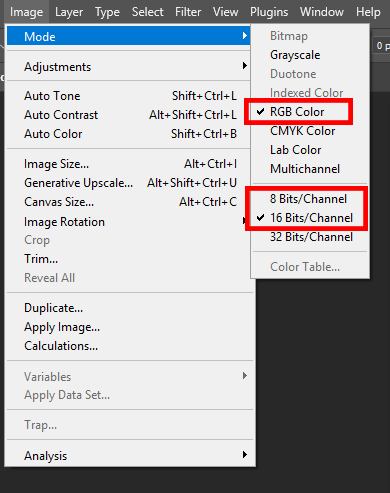
While the term “bit rate” is often used in video, for static image printing, we refer to this as Bit Depth. This setting determines the tonal range and color detail within your file.
16-bit: When printing on our 12-color Fine Art printer, we recommend working in 16-bit depth. This allows for significantly smoother gradients and superior detail in both shadow and highlight areas.
8-bit: If you are utilizing a standard or lower-ink printer, please keep your file at 8-bit depth. This ensures compatibility and prevents potential processing errors during the printing workflow.
Colour Profile Management
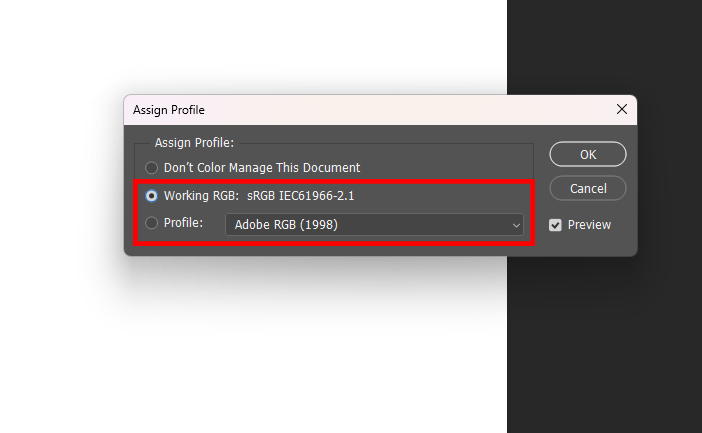
Managing color space is the most critical step in ensuring that what you see on your monitor matches the final print.
Selection: For fine art reproduction, we strongly recommend using the Adobe RGB color space due to its wider color gamut compared to sRGB.
Proactive Conversion: Please define your color profile before you begin editing your image. If your file is provided in a different profile, our system will automatically convert it to either sRGB or Adobe RGB during the print preparation process. This mandatory conversion can inadvertently shift the colors of your work. By setting the correct profile early, you effectively “soft-proof” your edits, ensuring the colors you see on your display remain as consistent as possible in the final print.
File Integrity and Saving
To preserve the highest possible quality and prevent file corruption, it is vital to follow proper saving procedures.
Flattening Layers: Before finalizing your file, you must flatten your layers. This eliminates complex layer effects and transparency issues that can sometimes cause rendering errors during the conversion process.
File Formats: Save your artwork in a high-fidelity, lossless file format. We recommend TIFF, PSD, or PSB. These formats retain all original image data without introducing the compression artifacts commonly found in JPEG files. Ensure you do not use lossy compression settings when saving your final master file.

Proofing: The Sample Strip
Technology can sometimes produce results that differ from what is perceived on a calibrated monitor. To mitigate this:
The Sample Strip: We highly recommend requesting a sample strip prior to committing to the full-scale final print. This is a vital quality control step that allows you to evaluate the actual color rendition, resolution, and ink-to-paper interaction. Examining a sample strip provides the final verification needed to ensure your artwork will be produced exactly as you envision it.